Best PSU for Ryzen 9 7900X & RX 9070 XT
This build is a powerhouse for 1440p and 4K gaming, easily handling demanding titles and productivity tasks with the efficient Ryzen 9 and high-performance Radeon GPU.
750W
574W
77%
High-end
🏆 Recommended Power Supplies
Hand-picked for your 750W target — sorted by overall value.

MSI MAG A750GL PCIE5, Fully Modular Compact Gaming 750W Power Supply, 80+ Gold, ATX 3.1 & PCIe 5.1 Ready, Native Dual-Color 12V-2×6 Cable, 10 Year Warranty
The MSI MAG A750GL is a standout choice for the Ryzen 9 7900X and Radeon RX 9070 XT, offering a compact footprint that eases cable management in mid-tower cases. Its native 12V-2×6 connector ensures seamless power delivery to modern GPUs without needing bulky adapters. With a 10-year warranty and fully modular design, this ATX 3.1 unit provides the long-term reliability and build flexibility required for a high-performance workstation and gaming hybrid.
- Native 12V-2×6 cable eliminates adapter clutter for the RX 9070 XT
- Compact 140mm depth improves airflow and cable routing in tight chassis
- Generous 10-year warranty provides peace of mind for high-end components
- Fan noise profile can become audible under heavy sustained gaming loads
- Included flat ribbon cables are somewhat stiff, complicating tight cable bends
Efficiency80+ Gold
FormATX
CablesFull-Modular
Price$89.99
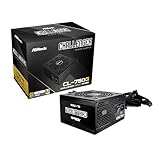
ASRock Challenger 750W Power Supply ATX 3.1 Auto iCOOL Intelligent Fan Control 120mm Golf Blade 5 Years Warranty CL-750G 80 Plus Gold Certified Non-Modular ATX3.1 PCIe5.1 12V-2×6 Cable
The ASRock Challenger 750W serves as a budget-conscious foundation for the Ryzen 9 7900X and RX 9070 XT, prioritizing core electrical performance over modular convenience. While it lacks modularity, the ATX 3.1 compliance and 12V-2×6 support ensure it handles the transient spikes common with high-end AMD hardware. The intelligent 'Golf Blade' fan control keeps acoustics manageable, making this a practical, no-frills option for builders who prioritize internal component quality over cable management aesthetics.
- ATX 3.1 and 12V-2×6 support handles transient spikes from the 9070 XT
- Golf Blade fan design effectively balances cooling performance with acoustic output
- High-quality internal components ensure stable power delivery for the 7900X
- Non-modular design makes cable management difficult in smaller PC builds
- Shorter 5-year warranty period lags behind premium modular competitors
Efficiency80+ Gold
FormATX
CablesNon-Modular
Price$50.99

CORSAIR RM750e ATX 3.1 PCIe 5.1 Ready Fully Modular 750W Power Supply – 12V-2×6 Cable Included, Cybenetics Gold Efficiency, 105°C-Rated Capacitors, Modern Standby Mode – Black
The Corsair RM750e is an excellent fit for the Ryzen 9 7900X and RX 9070 XT, leveraging Corsair's reputation for tight voltage regulation and quiet operation. Its fully modular design simplifies the build process, while the ATX 3.1 certification guarantees compatibility with the latest GPU power standards. Featuring 105°C-rated capacitors and Cybenetics Gold efficiency, this unit provides the stable, efficient power delivery necessary to keep a high-wattage CPU and GPU combination running optimally.
- Fully modular cabling simplifies installation for the Ryzen 9 7900X build
- 105°C-rated capacitors ensure longevity under high thermal loads during gaming
- Modern Standby support allows for faster wake times and improved energy efficiency
- Rifle bearing fan is less durable than fluid dynamic bearing alternatives
- Included cable set is relatively basic compared to Corsair's premium RMx line
Efficiency80+ Gold
FormATX
CablesFull-Modular
Price$89.99

MSI MAG A850GL PCIE5, Fully Modular Compact Gaming 850W Power Supply, 80+ Gold, ATX 3.1 & PCIe 5.1 Ready, Native Dual-Color 12V-2×6 Cable, 10 Year Warranty
The MSI MAG A850GL provides significant headroom for the Ryzen 9 7900X and RX 9070 XT, ensuring stable power delivery during aggressive transient spikes common in modern RDNA architecture. By opting for this 850W unit over the 750W baseline, you gain the thermal efficiency and overhead required for future GPU upgrades or overclocking headroom. Its native 12V-2×6 connector and ATX 3.1 compliance eliminate the need for cumbersome adapters, offering a cleaner, safer power path for high-draw components.
- Native 12V-2×6 connector ensures secure, adapter-free power delivery for high-performance AMD graphics cards.
- 850W capacity provides essential overhead for transient spikes and future-proofing your high-end component build.
- Compact 140mm chassis depth improves airflow and cable management in standard ATX mid-tower enclosures.
- The 120mm sleeve-bearing fan can become audible under heavy sustained loads compared to fluid dynamic alternatives.
- Included flat ribbon cables are somewhat stiff, which may complicate routing in tighter cable management channels.
Efficiency80+ Gold
FormATX
CablesFull-Modular
Price$109.99
Amazon.com prices as of 10/01/2026 22:24 GMT+0000 —
Details
Product prices and availability are accurate as of the date/time indicated and are subject to change.
Any price and availability information displayed on Amazon.com at the time of purchase will apply to the purchase of this product.
As an Amazon Associate, we earn from qualifying purchases.
📊 Quick Comparison
See the key differences at a glance.
| # | Model | Wattage | Efficiency | Modular | Price |
|---|---|---|---|---|---|
| 1 | MSI MAG A750GL PCIE5, Fully Modular Compact Gaming 750W Power Supply, 80+ Gold, ATX 3.1 & PCIe 5.1 Ready, Native Dual-Color 12V-2×6 Cable, 10 Year Warranty | 750W | 80+ Gold | Full-Modular | $89.99 |
| 2 | ASRock Challenger 750W Power Supply ATX 3.1 Auto iCOOL Intelligent Fan Control 120mm Golf Blade 5 Years Warranty CL-750G 80 Plus Gold Certified Non-Modular ATX3.1 PCIe5.1 12V-2×6 Cable | 750W | 80+ Gold | Non-Modular | $50.99 |
| 3 | CORSAIR RM750e ATX 3.1 PCIe 5.1 Ready Fully Modular 750W Power Supply – 12V-2×6 Cable Included, Cybenetics Gold Efficiency, 105°C-Rated Capacitors, Modern Standby Mode – Black | 750W | 80+ Gold | Full-Modular | $89.99 |
| ⬆️ | MSI MAG A850GL PCIE5, Fully Modular Compact Gaming 850W Power Supply, 80+ Gold, ATX 3.1 & PCIe 5.1 Ready, Native Dual-Color 12V-2×6 Cable, 10 Year Warranty Upgrade | 850W | 80+ Gold | Full-Modular | $109.99 |
🔌 Power Budget
Your system uses 77% of the recommended PSU output — well within the efficient operating range.
750W (Recommended)
System draw: 574W
Headroom: 176W (30%)
💡 Why 750W?
Power Calculation
CPU + GPU draw, plus ~100W for motherboard, RAM, fans, and storage.
30% Headroom
Extra capacity absorbs transient power spikes, keeps efficiency in the sweet spot, and leaves room for future upgrades.
80 Plus Efficiency
We only recommend certified PSUs. Higher ratings mean less wasted energy, lower heat, and quieter fans.
🌿 Power Efficiency Tips
Enable PBO Curve Optimizer to reduce CPU power draw and heat.
Use a high-airflow case to maintain optimal PSU operating temperatures.
🎯 What This Build Can Do
1440p Gaming
High-refresh rate gaming performance for demanding titles at 1440p resolution.
Content Creation
Efficient multi-threaded rendering and video editing workflows using the 7900X.
Productivity Workstation
Stable power delivery for intensive multitasking and professional software environments.
🔧 Installation Guide
Quick Checklist
- Mount the PSU with its fan aligned to your case airflow.
- Only connect cables you actually need (modular PSUs).
- Use dedicated PCIe power cables for AMD Radeon RX 9070 XT — no daisy-chaining.
- Boot-test with side panel open before final assembly.
⚠️ Special Note
Ensure the 12V-2×6 cable is fully seated to prevent connector overheating.
See PSU recommendations for other CPU + GPU combinations.
🔗 Explore More Builds