Best PSU for Core i7-14700K & RTX 5070 Ti
This powerful configuration easily handles demanding 1440p and 4K gaming alongside heavy content creation workflows.
750W
525W
70%
High-end
🏆 Recommended Power Supplies
Hand-picked for your 750W target — sorted by overall value.

MSI MAG A750GL PCIE5, Fully Modular Compact Gaming 750W Power Supply, 80+ Gold, ATX 3.1 & PCIe 5.1 Ready, Native Dual-Color 12V-2×6 Cable, 10 Year Warranty
Native ATX 3.1 support and dual-color 12V-2×6 connector reliably handle the RTX 5070 Ti power spikes.
Efficiency80+ Gold
FormATX
CablesFull-Modular
Price$99.20

be quiet! Pure Power 13 M 750W Power Supply, 80 Plusu00ae Gold Certification, ATX 3.1 PSU, Support for PCIe 5.1 GPUs, semi-Passive 120mm be quiet! Fan, LLC Technology, Single Rail, for Overclocked GPUs
Quiet operation and reliable LLC topology efficiently power the high-draw Intel Core i7-14700K.
Efficiency80+ Gold
FormATX
CablesNon-Modular
Price$89.90
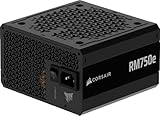
CORSAIR RM750e ATX 3.1 PCIe 5.1 Ready Fully Modular 750W Power Supply u2013 12V-2×6 Cable Included, Cybenetics Gold Efficiency, 105u00b0C-Rated Capacitors, Modern Standby Mode u2013 Black
Fully modular design and 105°C-rated capacitors ensure stable power delivery for demanding gaming sessions.
Efficiency80+ Gold
FormATX
CablesFull-Modular
Price$89.99

ASRock PRO 850G Power Supply – 850W 80 Plus Gold Certified, ATX 3.1 & PCIe 5.1 Ready, Native 12V-2×6 Connector, 120mm Low-Noise Fan, 3-Year Warranty
Stepping up to an 850W capacity gives your Intel Core i7-14700K and NVIDIA GeForce RTX 5070 Ti massive headroom for aggressive overclocks and severe transient spikes. This ASRock PRO 850G is built with ATX 3.1 and PCIe 5.1 compliance, featuring a native 12V-2×6 connector to safely feed modern high-draw graphics cards. While its non-modular design requires extra cable management effort behind the motherboard tray, it delivers rock-solid 80 Plus Gold efficiency.
- ATX 3.1 and PCIe 5.1 compliance with a native 12V-2×6 connector.
- Generous 850W capacity handles i7-14700K spikes and RTX 5070 Ti transients.
- Efficient 80 Plus Gold performance reduces thermal output during gaming sessions.
- Non-modular design leaves extra cables cluttering your chassis.
- Shorter three-year warranty trails industry standards set by competitors.
Efficiency80+ Gold
FormATX
CablesNon-Modular
Price$54.99
Amazon.com prices as of 11/18/2026 20:00 GMT+0000 —
Details
Product prices and availability are accurate as of the date/time indicated and are subject to change.
Any price and availability information displayed on Amazon.com at the time of purchase will apply to the purchase of this product.
As an Amazon Associate, we earn from qualifying purchases.
📊 Quick Comparison
See the key differences at a glance.
| # | Model | Wattage | Efficiency | Modular | Price |
|---|---|---|---|---|---|
| 1 | MSI MAG A750GL PCIE5, Fully Modular Compact Gaming 750W Power Supply, 80+ Gold, ATX 3.1 & PCIe 5.1 Ready, Native Dual-Color 12V-2×6 Cable, 10 Year Warranty | 750W | 80+ Gold | Full-Modular | $79.99 |
| 2 | be quiet! Pure Power 13 M 750W Power Supply, 80 Plusu00ae Gold Certification, ATX 3.1 PSU, Support for PCIe 5.1 GPUs, semi-Passive 120mm be quiet! Fan, LLC Technology, Single Rail, for Overclocked GPUs | 750W | 80+ Gold | Non-Modular | $89.90 |
| 3 | CORSAIR RM750e ATX 3.1 PCIe 5.1 Ready Fully Modular 750W Power Supply u2013 12V-2×6 Cable Included, Cybenetics Gold Efficiency, 105u00b0C-Rated Capacitors, Modern Standby Mode u2013 Black | 750W | 80+ Gold | Full-Modular | $89.99 |
| ⬆️ | ASRock PRO 850G Power Supply – 850W 80 Plus Gold Certified, ATX 3.1 & PCIe 5.1 Ready, Native 12V-2×6 Connector, 120mm Low-Noise Fan, 3-Year Warranty Upgrade | 850W | 80+ Gold | Non-Modular | $64.99 |
🔌 Power Budget
Your system uses 70% of the recommended PSU output — well within the efficient operating range.
750W (Recommended)
System draw: 525W
Headroom: 225W (30%)
💡 Why 750W?
Power Calculation
CPU + GPU draw, plus ~100W for motherboard, RAM, fans, and storage.
30% Headroom
Extra capacity absorbs transient power spikes, keeps efficiency in the sweet spot, and leaves room for future upgrades.
80 Plus Efficiency
We only recommend certified PSUs. Higher ratings mean less wasted energy, lower heat, and quieter fans.
🌿 Power Efficiency Tips
Enable C-states in BIOS to improve idle efficiency.
Keep ambient operating temperatures below 30°C for peak efficiency.
🎯 What This Build Can Do
High-End Gaming
Max settings 1440p and 4K gaming with high refresh rates.
Content Creation
Fast video editing, 3D rendering, and heavy multitasking workloads.
Power Efficiency
Balanced performance and thermal management for daily demanding tasks.
🔧 Installation Guide
Quick Checklist
- Mount the PSU with its fan aligned to your case airflow.
- Only connect cables you actually need (modular PSUs).
- Use dedicated PCIe power cables for NVIDIA GeForce RTX 5070 Ti — no daisy-chaining.
- Boot-test with side panel open before final assembly.
⚠️ Special Note
Route the native 12V-2×6 cable cleanly to avoid sharp bends.
See PSU recommendations for other CPU + GPU combinations.
🔗 Explore More Builds